Developer Guide
- Acknowledgements
- Setting up, getting started
- Design
- Implementation
- Documentation, logging, testing, configuration, dev-ops
- Appendix: Requirements
- Appendix: Instructions for manual testing
Acknowledgements
- Our project is based on AB3.
Setting up, getting started
Refer to the guide Setting up and getting started.
Design
 Tip: The
 .puml files used to create diagrams in this document can be found in the diagrams folder. Refer to the PlantUML Tutorial at se-edu/guides to learn how to create and edit diagrams.
Architecture
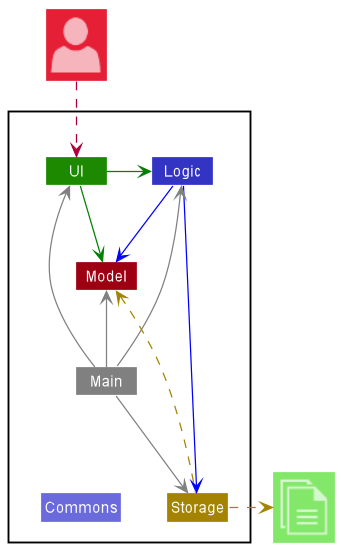
The Architecture Diagram given above explains the high-level design of the App.
Given below is a quick overview of main components and how they interact with each other.
Main components of the architecture
Main has two classes called Main and MainApp. It is responsible for,
- At app launch: Initializes the components in the correct sequence, and connects them up with each other.
- At shut down: Shuts down the components and invokes cleanup methods where necessary.
Commons represents a collection of classes used by multiple other components.
The rest of the App consists of four components.
-
UI: The UI of the App. -
Logic: The command executor. -
Model: Holds the data of the App in memory. -
Storage: Reads data from, and writes data to, the hard disk.
How the architecture components interact with each other
The Sequence Diagram below shows how the components interact with each other for the scenario where the user issues the command delete class 2.
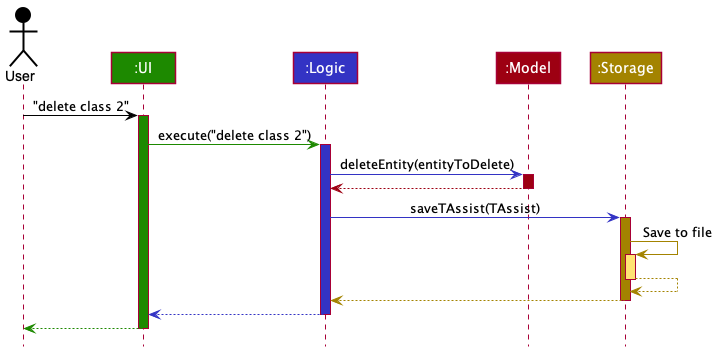
Each of the four main components (also shown in the diagram above),
- defines its API in an
interfacewith the same name as the Component. - implements its functionality using a concrete
{Component Name}Managerclass (which follows the corresponding APIinterfacementioned in the previous point.
For example, the Logic component defines its API in the Logic.java interface and implements its functionality using the LogicManager.java class which follows the Logic interface. Other components interact with a given component through its interface rather than the concrete class (reason: to prevent outside component’s being coupled to the implementation of a component), as illustrated in the (partial) class diagram below.
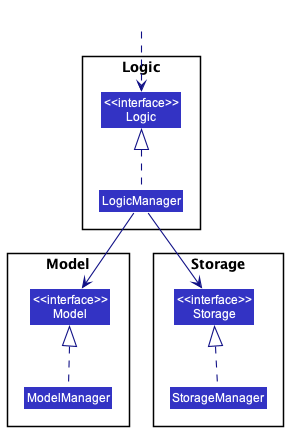
The sections below give more details of each component.
UI component
The API of this component is specified in Ui.java
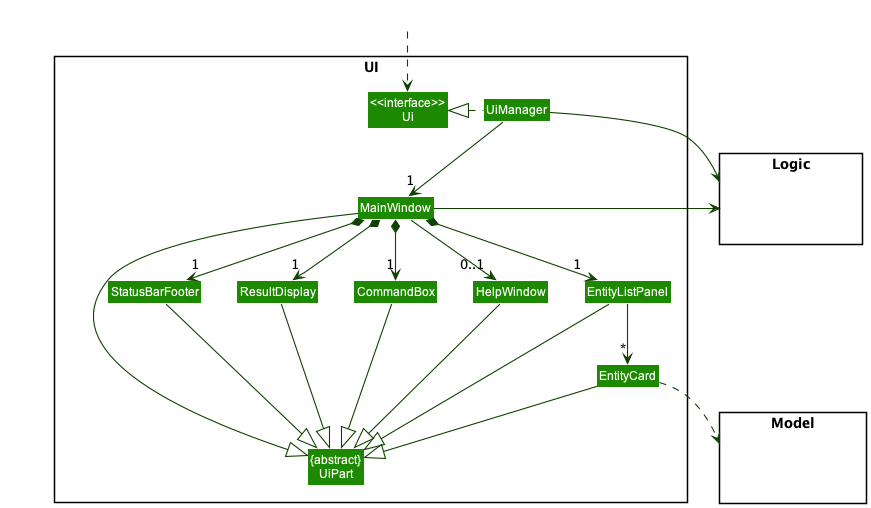
The UI consists of a MainWindow that is made up of parts e.g.CommandBox, ResultDisplay, *EntityListPanel, StatusBarFooter etc. All these, including the MainWindow, inherit from the abstract UiPart class which captures the commonalities between classes that represent parts of the visible GUI.
*EntityListPanel and *EntityListCard represent separate list panels and cards tailored for a specific entity (Student, ClassGroup, Module, Assessment).
The UI component uses the JavaFx UI framework. The layout of these UI parts are defined in matching .fxml files that are in the src/main/resources/view folder. For example, the layout of the MainWindow is specified in MainWindow.fxml
The UI component,
- executes user commands using the
Logiccomponent. - listens for changes to
Modeldata so that the UI can be updated with the modified data. - keeps a reference to the
Logiccomponent, because theUIrelies on theLogicto execute commands. - depends on some classes in the
Modelcomponent, as it displays variousEntityobjects residing in theModel.
Logic component
API : Logic.java
Here’s a (partial) class diagram of the Logic component:
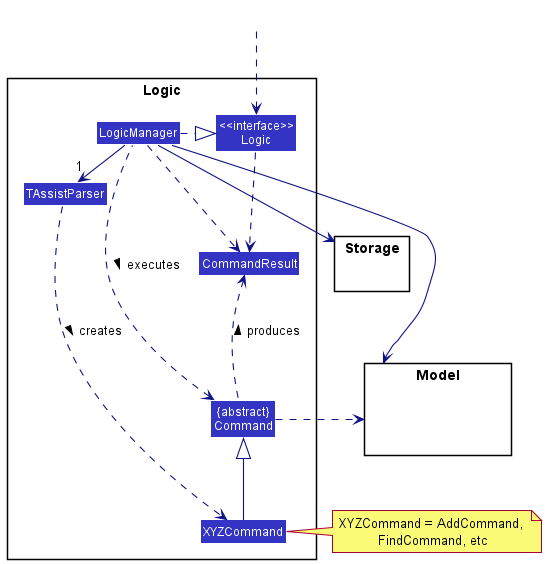
How the Logic component works:
- When
Logicis called upon to execute a command, it uses theTAssistParserclass to parse the user command. - This results in a
Commandobject (more precisely, an object of one of its subclasses e.g.,AddCommand) which is executed by theLogicManager. - The command can communicate with the
Modelwhen it is executed (e.g. to add a student). - The result of the command execution is encapsulated as a
CommandResultobject which is returned back fromLogic.
The Sequence Diagram below illustrates the interactions within the Logic component for the execute("delete class 2") API call.
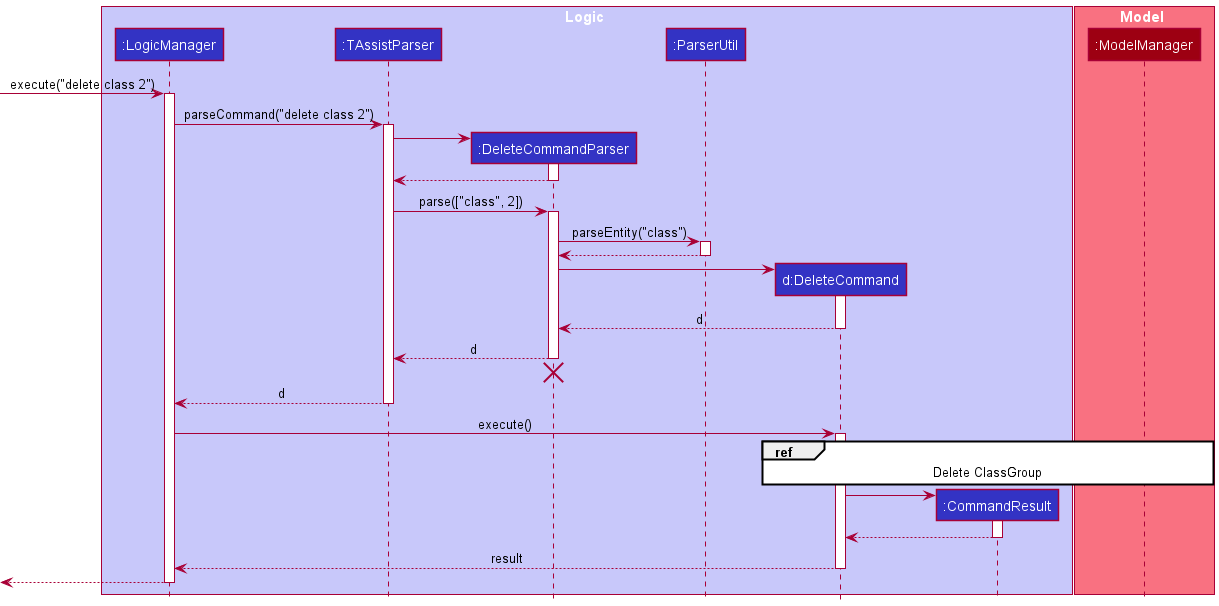
 Note: The lifeline for
 DeleteCommandParser should end at the destroy marker (X) but due to a limitation of PlantUML, the lifeline reaches the end of diagram.
Here are the other classes in Logic (omitted from the class diagram above) that are used for parsing a user command:
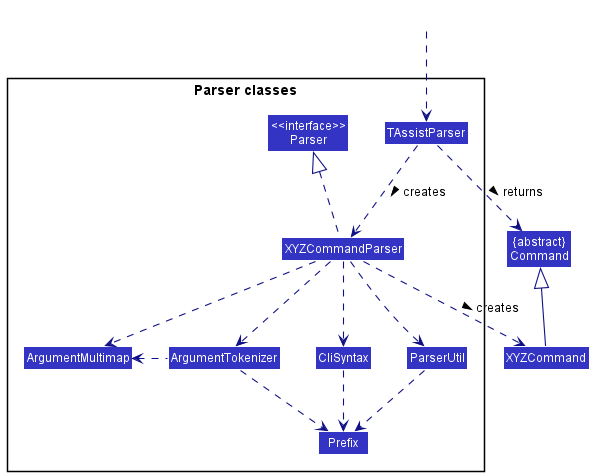
How the parsing works:
- When called upon to parse a user command, the
TAssistParserclass creates anXYZCommandParser(XYZis a placeholder for the specific command name e.g.,AddCommandParser) which uses the other classes shown above to parse the user command and create aXYZCommandobject (e.g.,AddCommand) which theTAssistParserreturns back as aCommandobject. - All
TAssistParserclasses (e.g.,AddCommandParser,DeleteCommandParser, …) inherit from theParserinterface so that they can be treated similarly where possible e.g, during testing.
Model component
API : Model.java
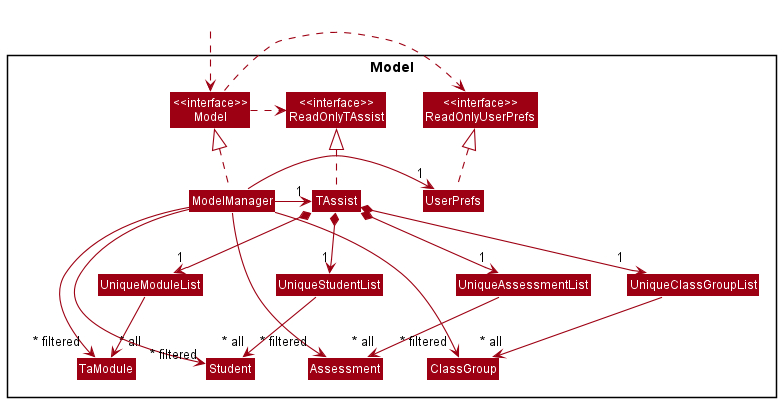
The Model component,
- stores the TAssist data i.e., all
Student,TaModule,ClassGroup,Assessmentobjects (which are contained inUniqueStudentList,UniqueModuleList,UniqueClassGroupList,UniqueAssessmentListobjects respectively). - stores the currently ‘selected’
Student/TaModule/ClassGroup/Assessmentobjects (e.g., results of a search query) as a separate filtered list which is exposed to outsiders as an unmodifiableObservableList<Student>/ObservableList<TaModule>/ObservableList<ClassGroup>/ObservableList<Assessment>that can be ‘observed’ e.g. the UI can be bound to this list so that the UI automatically updates when the data in the list change. - stores a
UserPrefobject that represents the user’s preferences. This is exposed to the outside as aReadOnlyUserPrefobjects. - does not depend on any of the other three components (as the
Modelrepresents data entities of the domain, they should make sense on their own without depending on other components). - An
Entityobject is a generic object that can be used to represent instances ofStudent/TaModule/ClassGroup/Assessment. - Module are named
TaModuledue to conflict with Java classes.
Note: Alternative (arguably, more OOP) models are given below.| Entity | Class Diagram |
| Student |
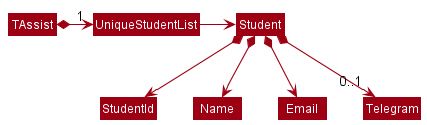
|
| TaModule |
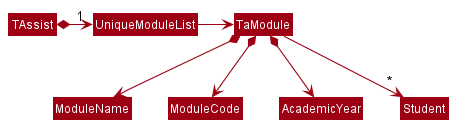
|
| Class Group |
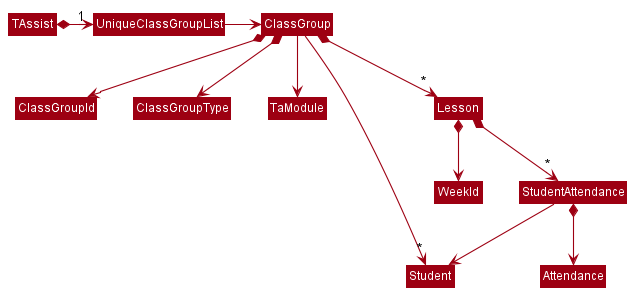
|
| Assessment |
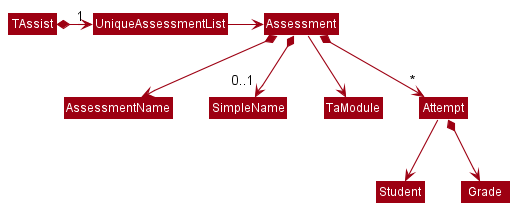
|
Storage component
API : Storage.java
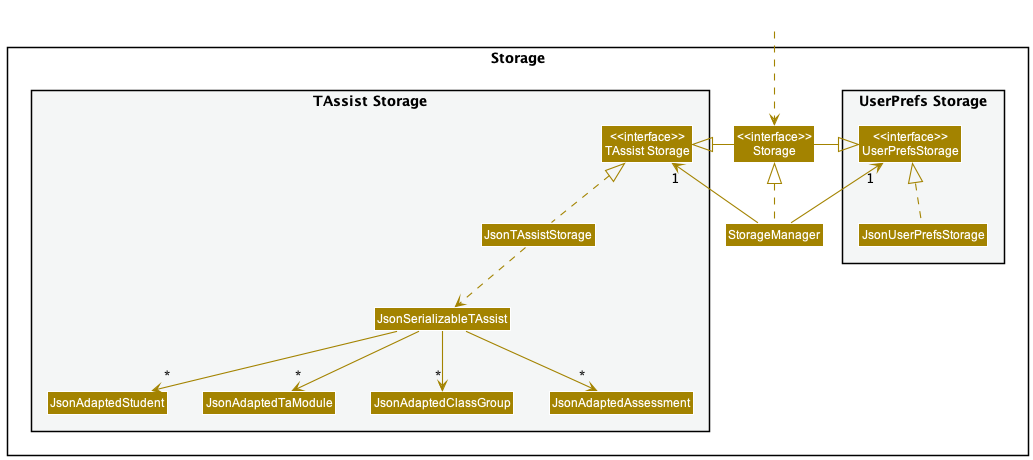
The Storage component,
- can save both TAssist data and user preference data in json format, and read them back into corresponding objects.
- inherits from both
TAssistStorageandUserPrefStorage, which means it can be treated as either one (if only the functionality of only one is needed). - depends on some classes in the
Modelcomponent (because theStoragecomponent’s job is to save/retrieve objects that belong to theModel)
Common classes
Classes used by multiple components are in the seedu.address.commons package.
Implementation
This section describes some noteworthy details on how certain features are implemented.
Add Feature
The add mechanism is facilitated by TAssist. Its functionality, usage and behaviour is the same for all entities. Additionally, it implements the following operations:
-
AddCommandParser#parse()— Parses the command arguments. -
AddCommand#execute()— ExecutesModelManager#addEntity()with the specified entity. -
ModelManager#addEntity()— Adds the specified entity.
Given below is an example usage scenario for the creation of Student object and how the add mechanism behaves at each step.
Note: As TAssist comes with initial data, the user should issue a clear command to remove all existing data.
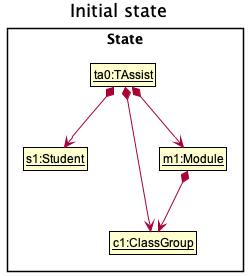
Step 1. The user launches the application. The TAssist is already populated with data.
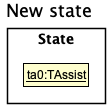
Step 2. The user executes clear command to remove all existing data in TAssist.
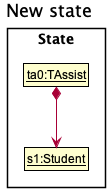
Step 3. The user executes add student command to add a student to TAssist. The add command also calls AddCommandParser#parse(), which parses the input and returns the index and entity type.
- An example of the
add studentcommand:add student id/E0123456 n/John Doe e/johnd@u.nus.edu t/john_doe
Note: If a command fails its execution, it will not call AddCommand#execute(), instead a CommandException will be thrown and no entity will be added.
The following sequence diagram shows how the add operation works:
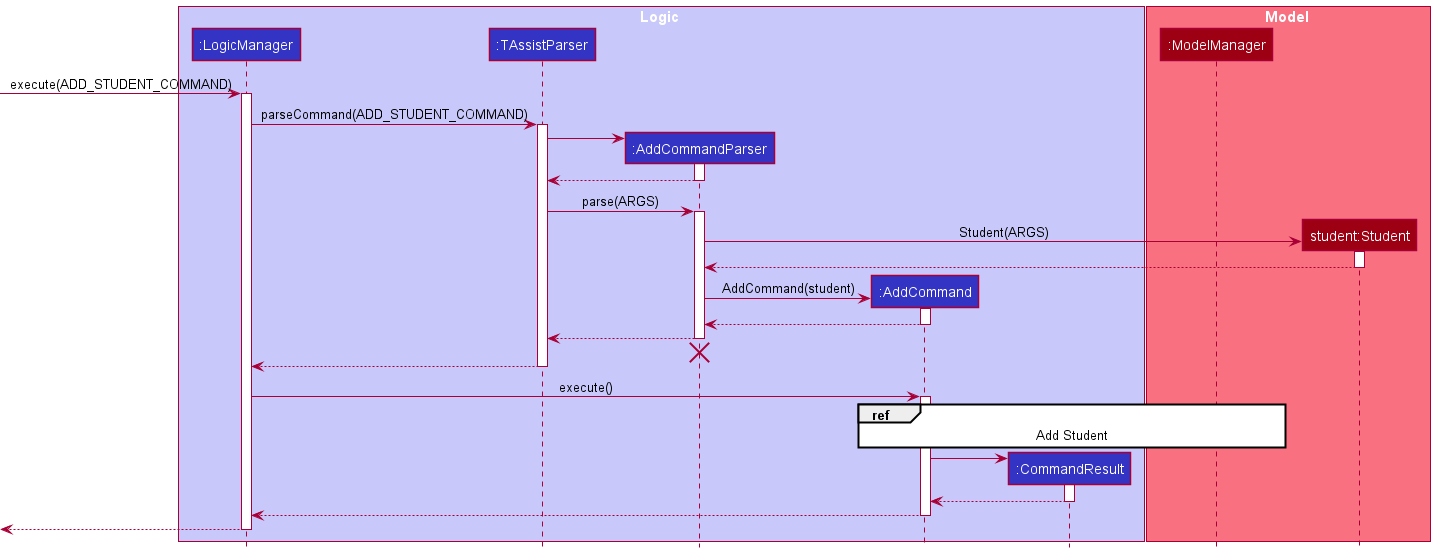
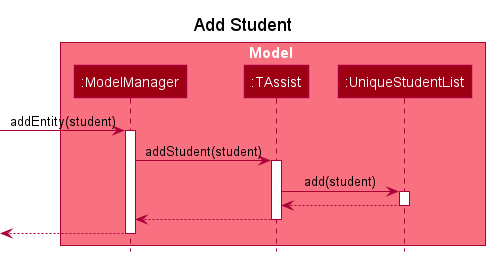
Note: The lifeline for AddCommandParser should end at the destroy marker (X) but due to a limitation of PlantUML, the lifeline reaches the end of diagram.
The following activity diagram summarizes what happens when a user executes an add command:
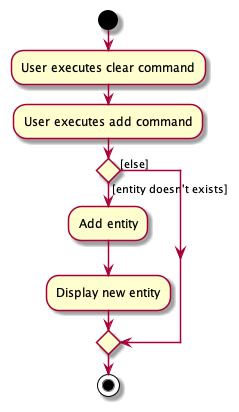
Delete Feature
The delete mechanism is facilitated by TAssist. Its functionality, usage and behaviour is the same for all entities. Additionally, it implements the following operations:
-
DeleteCommandParser#parse()— Parses the command arguments. -
DeleteCommand#execute()— ExecutesModelManager#deleteEntity()with the specified entity. -
ModelManager#deleteEntity()— Deletes the specified entity. -
ModelManager#deleteEntity()— Deletes the specified entity.
However, when a TaModule object is deleted, its associated ClassGroup and Assessment object(s) are also deleted.
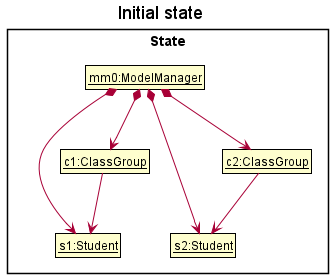
Given below is an example usage scenario using ClassGroup objects and how the delete mechanism behaves at each step.
Step 1. The user launches the application. The TAssist is already populated with data.
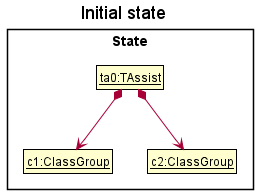
Step 2. The user executes list class command to list the class groups in the TAssist. The list command implementation is detailed below in the List Feature section.
Step 3. The user executes delete class 2 to delete the 2nd class group in the list which is c2. The delete command also calls DeleteCommandParser#parse(), which parses the input and return the index and entity type.
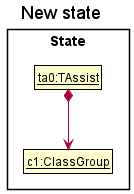
Note: If a command fails its execution, it will not call DeleteCommand#execute(), instead a CommandException will be thrown and no entities will be deleted.
The following sequence diagram shows how the delete operation works:
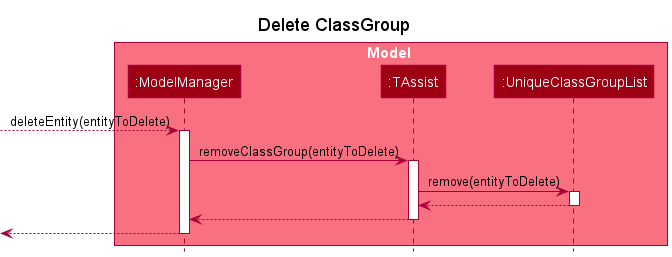
Note: The lifeline for DeleteCommandParser should end at the destroy marker (X) but due to a limitation of PlantUML, the lifeline reaches the end of diagram.
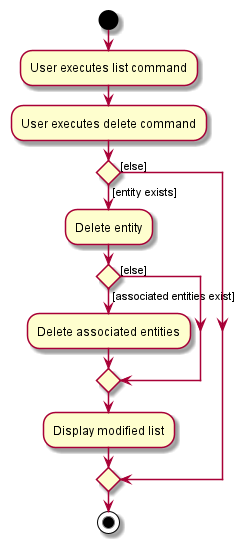
The following activity diagram summarizes what happens when a user executes a delete command:
List Feature
The list mechanism is facilitated by TAssist. Its functionality, usage and behaviour is the same for all entities. Additionally, it implements the following operations:
-
ListCommandParser#parse()— Parses the command arguments. -
ListCommand#execute()— ExecutesModelManager#updateFiltered<ENTITY_NAME>List()with the predicate that matches the filtering criteria. -
ModelManager#updateFiltered<ENTITY_NAME>List()— Updates the predicate of the entity list so that only filtered entries will be shown inTAssist.
Given below is an example usage scenario using Student objects and how the list mechanism behaves at each step.
Step 1. The user launches the application. The TAssist is already populated with data.
Step 2. The user executes list student c/2 to filter out students from the 2nd class group in the list. The list command also calls ListCommandParser#parse(), which parses the input and return the entity type as well as the class group index or TA module index to filter by.
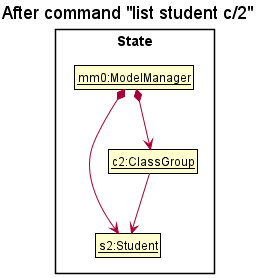
The following sequence diagram shows how the list operation works:
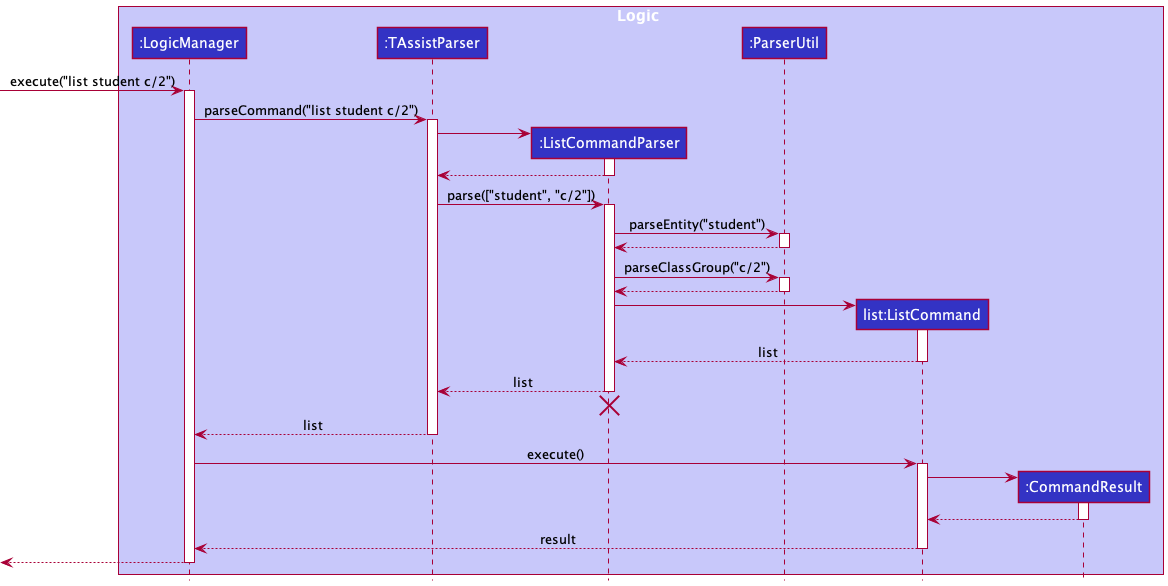
Note: The lifeline for ListCommandParser should end at the destroy marker (X) but due to a limitation of PlantUML, the lifeline reaches the end of diagram.
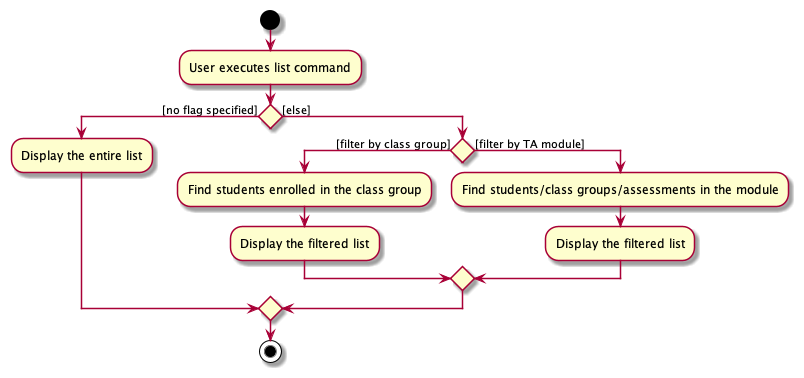
The following activity diagram summarizes what happens when a user executes a list command:
Enrol Feature
Implementation
The enrol mechanism is facilitated by TAssist. Its functionality, usage and behaviour is only for student entity. Additionally, it implements the following operations:
-
EnrolCommandParser#parse()— Parses the command arguments. -
EnrolCommand#execute()— ExecutesModelManager#enrolStudent()with given student(s) and class group. -
ModelManager#enrolStudent()— Enrols student(s) to a given class group.
Given below is an example usage scenario for the enrolment of a Student object to a ClassGroup object and how the enrol mechanism behaves at each step.
Assumption: Valid Student, Module and ClassGroup objects are created beforehand.
Step 1. The user launches the application. The TAssist is already populated with data.
Step 2. The user executes enrol command to enrol student(s) to a ClassGroup. The enrol command also calls EnrolCommandParser#parse(), which parses the input and returns a successful/unsuccessful output message.
- An example of the
enrolcommand:enrol c/1 s/1
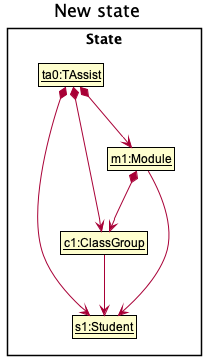
Note: 1. Student(s) enrolled to a class group will automatically be linked to the module it belongs to.
2. If a command fails its execution, it will still call
EnrolCommand#execute(), and a CommandException will be thrown and only the valid student(s) will be enrolled to the given class group.
The following sequence diagram shows how the enrol operation works:
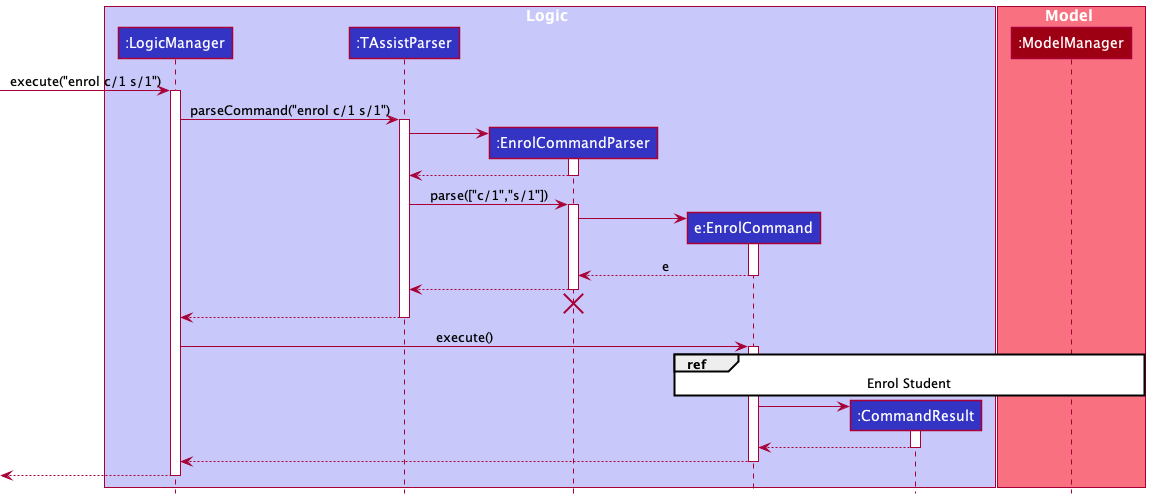
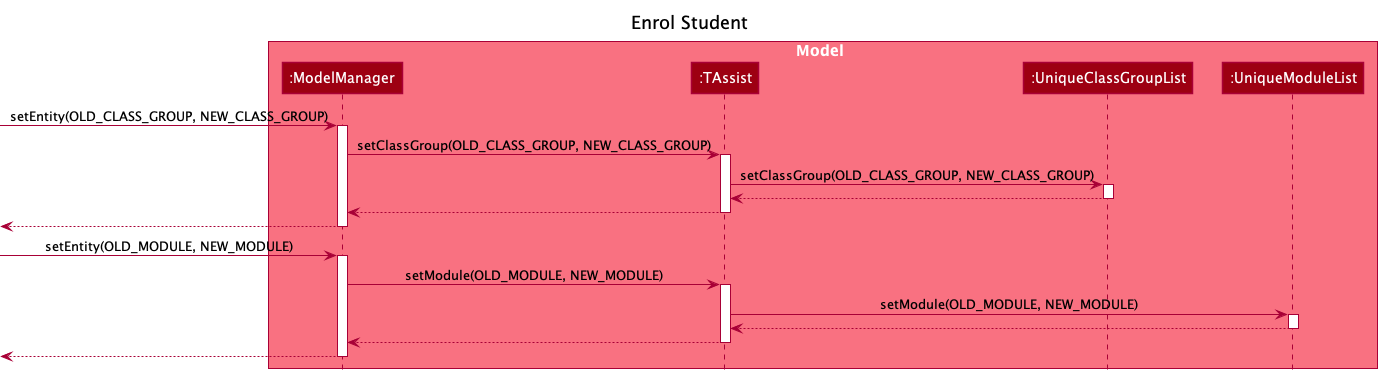
Note: The lifeline for EnrolCommandParser should end at the destroy marker (X) but due to a limitation of PlantUML, the lifeline reaches the end of diagram.
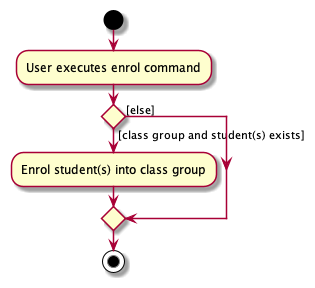
The following activity diagram summarizes what happens when a user executes an enrol command:
Grading Assessment Feature
Implementation
The grading assessment mechanism is facilitated by TAssist. Since there are various gradable components, a new entity Assessment will benefit the application. This entity will allow tutors to customize what are the different gradable components, from assignments to class participations. Tutors can add, delete and list this entity like the other entities. On top of that, they will be able to grade the assessment, using the grade command. The following operations will be implemented for the grade command:
-
GradeCommandParser#parse()— Parses the command arguments. -
GradeCommand#execute()— ExecutesModelManager#gradeAssessment()with the specified assessment, students and the grade they get. -
ModelManager#gradeAssessment()— Grades the students for the specified assessment.
The Assessment entity will be tied to a specific module. Hence, when a TaModule object is deleted, its associated Assessment objects are also deleted.
Given below is an example usage scenario of how the grading mechanism behaves at each step.
Assumption: Valid Student, Module, ClassGroup and Assessment objects are created beforehand. Student objects are enrolled to the Module as well.
Step 1. The user launches the application. The TAssist is already populated with the necessary data.
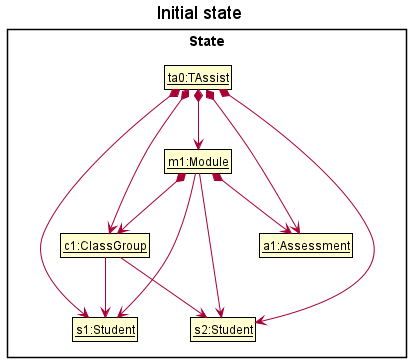
Step 2. The user executes grade a/1 s/1,2 g/1 command to grade the 1st assessment (a1) for the 1st and 2nd students (s1 and s2 respectively) enrolled in the module with grade 1 in the TAssist. The grade command would call the GradeCommandParser#parse(), which parses the input and return the assessment to grade, which students to grade and what is the grade the students will get for the assessment.
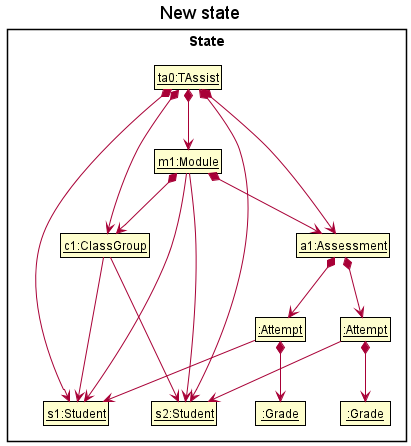
Note: If a command fails its execution, it will still call GradeCommand#execute(), and both valid and invalid grading attempts will be printed out.
The following sequence diagram shows how the grade operation works:
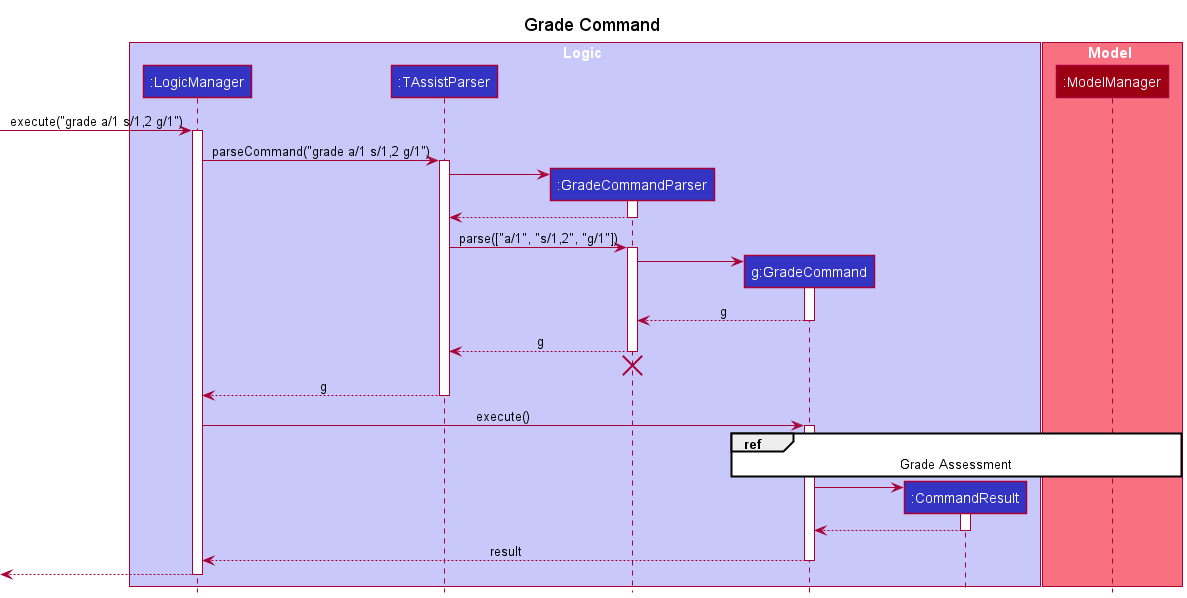
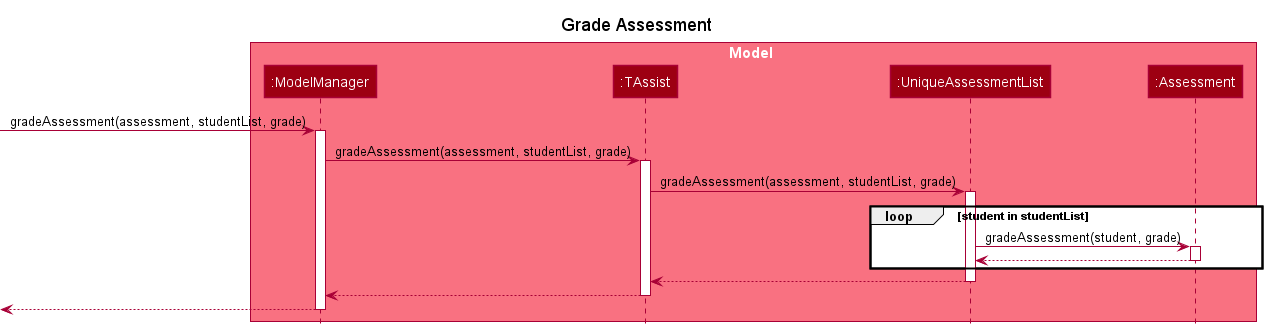
Note: The lifeline for GradeCommandParser should end at the destroy marker (X) but due to a limitation of PlantUML, the lifeline reaches the end of diagram.
The following activity diagram summarizes what happens when a user executes a grade command:
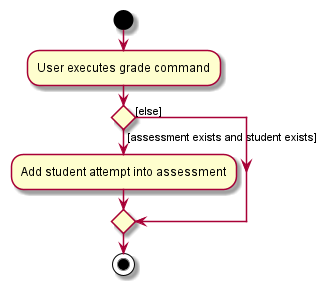
Design considerations
Aspect: How to grade assessments:
-
Alternative 1 (current choice): Create
Assessmententity and this entity will contain the students attempts.- Pros: Easy to implement.
- Cons: Duplicate data in storage, and need to ensure data is deleted properly if student/module is deleted.
-
Alternative 2: Create
Assessmententity and theTaModuleentity will contain the student attempts.- Pros: All module related data are in one class.
- Cons: Duplicate data in storage, hard to display assessments attempts.
Mark/Unmark feature
Implementation
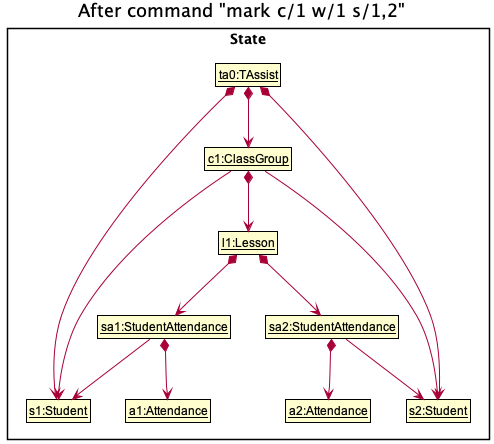
The mark/unmark mechanism is facilitated by TAssist. Its functionality, usage and behaviour is currently exclusive to StudentAttendance. Additionally, it implements the following operations:
-
MarkCommandParser#parse()— Parses the command arguments. -
MarkCommand#execute()— ExecutesModelManager#markAttendance()orModelManager#unmarkAttendancebased on a specified class group index and week number. -
ModelManager#markAttendance()— Updates the specifiedLessonobject with a list ofStudentAttendanceobjects.
Given below is an example usage scenario using mark which illustrates how the mechanism behaves at each step.
Step 1. The user launches the application. The TAssist is already populated with data.
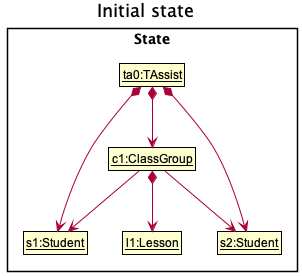
Step 2. The user executes list class command to list the class groups in the TAssist. The list command implementation is detailed below in the List Feature section.
Step 3. The user executes list student c/1 command to list all the students in the class group with index 1.
Step 4. The user executes mark c/1 w/1 s/1,2 to mark attendance for a lesson which belongs to a class group with index 1 and occurs in week 1. Students with indexes 1 and 2 are marked as having attended. The mark command also calls MarkCommandParser#parse(), which parses the input and returns a successful/unsuccessful message.
The following sequence diagram shows how the mark operation works:
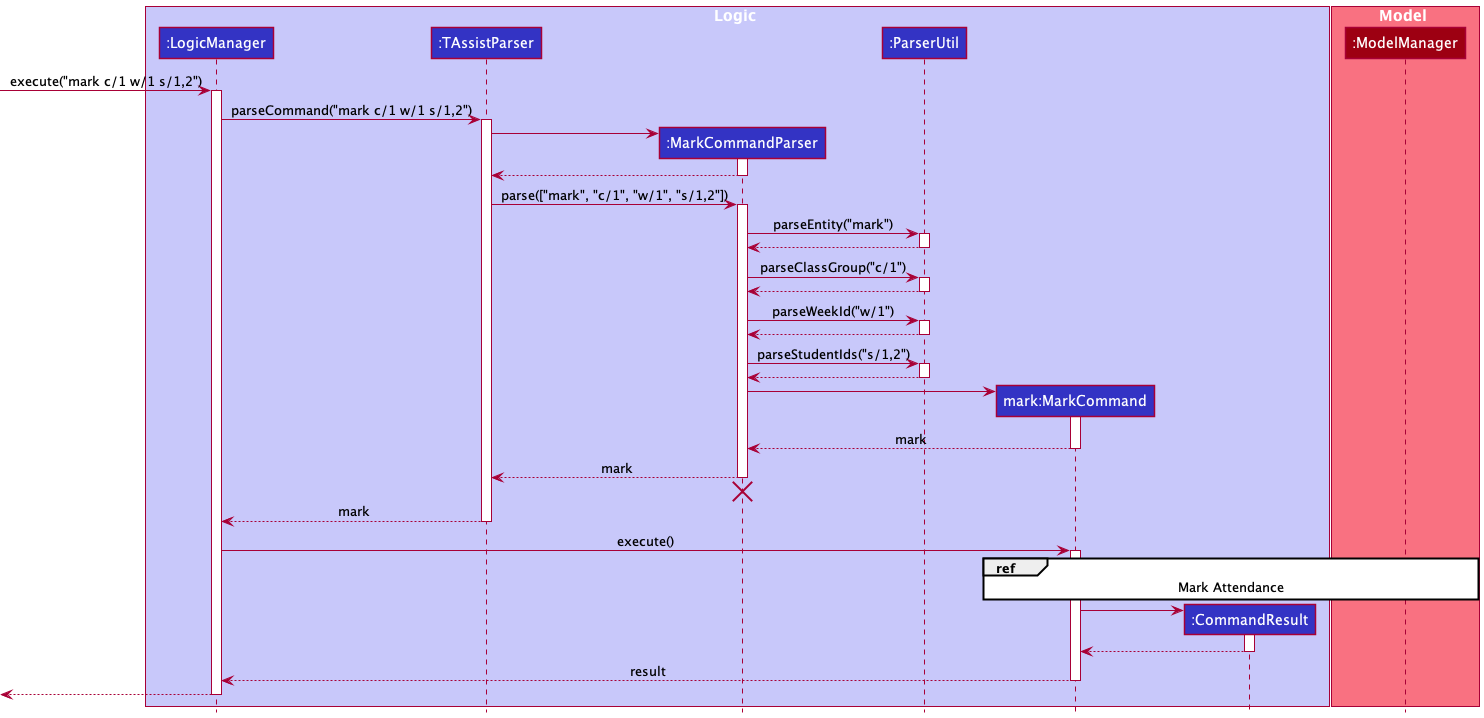
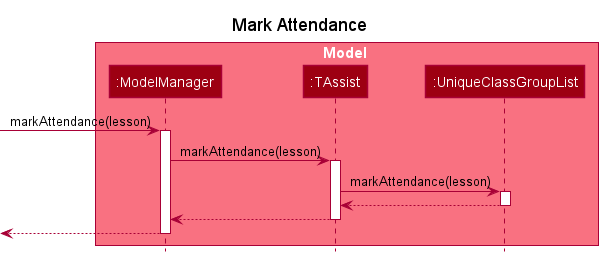
Note: The lifeline for MarkCommandParser should end at the destroy marker (X) but due to a limitation of PlantUML, the lifeline reaches the end of diagram.
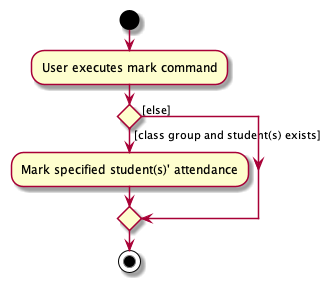
The following activity diagram summarizes what happens when a user executes a mark command:
Documentation, logging, testing, configuration, dev-ops
Appendix: Requirements
Product scope
Target user profile:
- TA in charge of teaching NUS modules
- Needs to manage a significant number of student contacts
- Might be instructing multiple modules/classes
- Prefers desktop apps over other types
- Types fast
- Prefers typing to mouse interactions
- Is reasonably comfortable using CLI apps
Value proposition: TAssist creates a more conducive learning environment for educators and students by helping TAs consolidate students’ contacts and monitor their progress for all modules/classes taught by the TAs.
TAssist User Stories
Priorities: High (must have) - * * *, Medium (nice to have) - * *, Low (unlikely to have) - *
| No | As a … | I can… | So that I can… | Notes | Priority |
|
1 |
TA |
[EPIC] Manage my students in my contacts
|
keep in contact with them. |
|
*** |
|
2 |
TA |
[EPIC] Manage the modules I am teaching
|
monitor the modules I am teaching this semester. |
|
*** |
|
3 |
TA |
[EPIC] Manage the class groups I am teaching
|
monitor the class groups I have to teach. |
|
*** |
|
4 |
TA |
[EPIC] Manage the assessments I assign
|
monitor the assessments I assign. |
|
*** |
|
5 |
TA |
[EPIC] Manage students in the modules I am teaching
|
easily monitor the students I am teaching in a module. |
|
*** |
|
6 |
TA |
[EPIC] Manage students in the class groups I am teaching
|
easily monitor the students I am teaching in a class group. |
|
*** |
|
7 |
TA |
[EPIC] Manage class groups in the modules I am teaching
|
easily monitor the class groups I am teaching in a module. |
|
*** |
|
8 |
TA |
[EPIC] Manage assessments in the modules I am teaching
|
easily monitor the assessments I am assigning in a module. |
|
*** |
|
9 |
TA |
Keep track of students’ attendance Conditions:
|
focus on students who have not been attending lessons. |
|
*** |
|
10 |
TA |
Keep track of students’ assessment attempts Conditions:
|
grade students' assessment attempts. |
|
*** |
|
11 |
TA |
edit the attributes of the things I created List of things I should be able to edit:
|
modify any attributes that I entered wrongly. |
|
** |
Use cases
(For all use cases below, the System is the TAssist and the Actor is the TA, unless specified otherwise)
Use case 01: Add a module
MSS
- TA requests to add a new module with the specified details.
-
TAssist adds the new module and displays its details.
Use case ends.
Extensions
-
1a. TAssist detects an error in the entered command.
-
1a1. TAssist prompts for the correct command.
-
1a2. TA enters a new command.
Steps 1a1-1a2 are repeated until the command entered is correct.
Use case resumes from step 2.
-
Use case 02: Add a student
MSS
- TA requests to add a new student with the specified details.
-
TAssist adds the new student and displays their details.
Use case ends.
Extensions
-
1a. TAssist detects an error in the entered command.
-
1a1. TAssist prompts for the correct command.
-
1a2. TA enters a new command.
Steps 1a1-1a2 are repeated until the command entered is correct.
Use case resumes from step 2.
-
Use case 03: Add a class group
Preconditions: The module that the class group will be added to already exists.
MSS
- TA requests to list modules (UC10).
- TA requests to add a new class group with the specified details.
-
TAssist adds the new class group and displays its details.
Use case ends.
Extensions
-
2a. TAssist detects an error in the entered command.
-
2a1. TAssist prompts for the correct command.
-
2a2. TA enters a new command.
Steps 2a1-2a2 are repeated until the command entered is correct.
Use case resumes from step 3.
-
Use case 04: Add an assessment
Preconditions: The module that the assessment will be added to already exists.
MSS
- TA requests to list modules (UC10).
- TA requests to add a new assessment with the specified details.
-
TAssist adds the new assessment and displays its details.
Use case ends.
Extensions
-
2a. TAssist detects an error in the entered command.
-
2a1. TAssist prompts for the correct command.
-
2a2. TA enters a new command.
Steps 2a1-2a2 are repeated until the command entered is correct.
Use case resumes from step 3.
-
Use case 05: Enrolling student(s)
Preconditions:
- The student(s) to be enrolled already exist.
- The class group that the student(s) will be enrolled in already exists.
MSS
- TA requests to enrol one/more student(s) into a particular class group.
-
TAssist enrols the student(s) and displays their details.
Use case ends.
Extensions
-
1a. TAssist detects an error in the entered command.
-
1a1. TAssist prompts for the correct command.
-
1a2. TA enters a new command.
Steps 1a1-1a2 are repeated until the command entered is correct.
Use case resumes from step 2.
-
Use case 06: Disenrolling student(s)
Preconditions: The student(s) to be disenrolled is already enrolled in the class group.
MSS
- TA requests to disenrol one/more student(s) from a particular class group.
-
TAssist disenrols the student(s) and displays their details.
Use case ends.
Extensions
-
1a. TAssist detects an error in the entered command.
-
1a1. TAssist prompts for the correct command.
-
1a2. TA enters a new command.
Steps 1a1-1a2 are repeated until the command entered is correct.
Use case resumes from step 2.
-
Use case 07: Marking students’ attendances
Preconditions: The student(s) whose attendance(s) is to be marked is already enrolled in the class group.
MSS
- TA requests to mark one/more student(s) attendance(s) from a particular class group.
-
TAssist marks the attendance(s) and displays their details.
Use case ends.
Extensions
-
1a. TAssist detects an error in the entered command.
-
1a1. TAssist prompts for the correct command.
-
1a2. TA enters a new command.
Steps 1a1-1a2 are repeated until the command entered is correct.
Use case resumes from step 2.
-
Use case 08: Unmarking students’ attendances
Preconditions: The student(s) whose attendance(s) is to be unmarked is already enrolled in the class group.
MSS
- TA requests to unmark one/more student(s) attendance(s) from a particular class group.
-
TAssist unmarks the attendance(s) and displays their details.
Use case ends.
Extensions
-
1a. TAssist detects an error in the entered command.
-
1a1. TAssist prompts for the correct command.
-
1a2. TA enters a new command.
Steps 1a1-1a2 are repeated until the command entered is correct.
Use case resumes from step 2.
-
Use case 09: Grading assessments
Preconditions: The student(s) are already enrolled in the module that the assessment is associated with.
MSS
- TA requests to grade one/more student(s) assessment(s) from a particular module.
-
TAssist grade the assessment(s) and displays their details.
Use case ends.
Extensions
-
1a. TAssist detects an error in the entered command.
-
1a1. TAssist prompts for the correct command.
-
1a2. TA enters a new command.
Steps 1a1-1a2 are repeated until the command entered is correct.
Use case resumes from step 2.
-
Use case 10: List modules
MSS
- TA requests to list modules.
-
TAssists displays the details of all modules.
Use case ends.
Extensions
-
1a. TAssist detects an error in the entered command.
-
1a1. TAssist prompts for the correct command.
-
1a2. TA enters a new command.
Steps 1a1-1a2 are repeated until the command entered is correct.
Use case resumes from step 2.
-
Use case 11: List/filter students
MSS
- TA requests to list students.
-
TAssist displays the details of all students.
Use case ends.
Extensions
-
1a. TA requests to filter students by a specific module.
-
1a1. TAssist displays the details of students belonging to the specified module.
Use case ends.
-
-
1b. TA requests to filter students by a specific class group.
-
1b1. TAssist displays the details of students belonging to the specified class group.
Use case ends.
-
-
1c. TAssist detects an error in the entered command.
-
1c1. TAssist prompts for the correct command.
-
1c2. TA enters a new command.
Steps 1c1-1c2 are repeated until the command entered is correct.
Use case resumes from step 2.
-
Use case 12: List/filter class groups
MSS
- TA requests to list class groups.
-
TAssist displays the details of all class groups.
Use case ends.
Extensions
-
1a. TA requests to filter class groups by a specific module.
-
1a1. TAssist displays the details of class groups belonging to the specified module.
Use case ends.
-
-
1b. TAssist detects an error in the entered command.
-
1b1. TAssist prompts for the correct command.
-
1b2. TA enters a new command.
Steps 1b1-1b2 are repeated until the command entered is correct.
Use case resumes from step 2.
-
Use case 13: List/filter assessments
MSS
- TA requests to list assessments.
-
TAssist displays the details of all assessments.
Use case ends.
Extensions
-
1a. TA requests to filter assessments by a specific module.
-
1a1. TAssist displays the details of assessments belonging to the specified module.
Use case ends.
-
-
1b. TAssist detects an error in the entered command.
-
1b1. TAssist prompts for the correct command.
-
1b2. TA enters a new command.
Steps 1b1-1b2 are repeated until the command entered is correct.
Use case resumes from step 2.
-
Use case 14: Find students by name
MSS
- TA requests to find students with specific keyword(s).
-
TAssist displays the details of all students whose name contains one/more of the specified keyword(s).
Use case ends.
Extensions
-
1a. TAssist detects an error in the entered command.
-
1a1. TAssist prompts for the correct command.
-
1a2. TA enters a new command.
Steps 1a1-1a2 are repeated until the command entered is correct.
Use case resumes from step 2.
-
-
2a. The list is empty.
Use case ends.
Use case 15: Delete a module
MSS
- TA requests to list modules (UC10).
- TA requests to delete a specific module in the list.
-
TAssist deletes the module and the class groups and assessments associated with it.
Use case ends.
Extensions
-
2a. The list is empty.
Use case ends.
-
2b. TAssist detects an error in the entered command.
-
2b1. TAssist prompts for the correct command.
-
2b2. TA enters a new command.
Steps 2b1-2b2 are repeated until the command entered is correct.
Use case resumes from step 3.
-
Use case 16: Delete a student
MSS
- TA requests to list students (UC11).
- TA requests to delete a specific student in the list.
-
TAssist deletes the student and their associated assessment attempts.
Use case ends.
Extensions
-
2a. The list is empty.
Use case ends.
-
2b. TAssist detects an error in the entered command.
-
2b1. TAssist prompts for the correct command.
-
2b2. TA enters a new command.
Steps 2b1-2b2 are repeated until the command entered is correct.
Use case resumes from step 3.
-
Use case 17: Delete a class group
MSS
- TA requests to list class groups (UC12).
- TA requests to delete a specific class group in the list.
-
TAssist deletes the class group.
Use case ends.
Extensions
-
2a. The list is empty.
Use case ends.
-
2b. TAssist detects an error in the entered command.
-
2b1. TAssist prompts for the correct command.
-
2b2. TA enters a new command.
Steps 2b1-2b2 are repeated until the command entered is correct.
Use case resumes from step 3.
-
Use case 18: Delete an assessment
MSS
- TA requests to list assessments (UC13).
- TA requests to delete a specific assessment in the list.
-
TAssist deletes the assessment.
Use case ends.
Extensions
-
2a. The list is empty.
Use case ends.
-
2b. TAssist detects an error in the entered command.
-
2b1. TAssist prompts for the correct command.
-
2b2. TA enters a new command.
Steps 2b1-2b2 are repeated until the command entered is correct.
Use case resumes from step 3.
-
Non-Functional Requirements
- Should work on any mainstream OS as long as it has Java
11or above installed. - Should be able to hold up to 1000 entities without a noticeable sluggishness in performance for typical usage.
- A user with above average typing speed for regular English text (i.e. not code, not system admin commands) should be able to accomplish most of the tasks faster using commands than using the mouse.
- Should not depend on external/remote servers.
- Should not depend on a Database Management System (DBMS).
Glossary
- Assessment: Various gradable component that the TA can add into the module. E.g. Class participation, Lab 1, Lab 2 Report
- Class Group: The different types of classes a module has. E.g. T01, T02, B01, B02
- CLI: Command line interface
- Entity: A generic object used in TAssist, which can be an instance of Assessment, ClassGroup, Module, or Student
- GUI: Graphical user interface
- Lesson: The weekly lesson that students turn up for
- Mainstream OS: Windows, Linux, Unix, OS-X
- Module: A NUS SoC module
- MSS: Main Success Scenario
- NUS: The National University of Singapore
- Student: A student in NUS
- TA: A Teaching Assistant in NUS SoC
- TaModule: Represents a Module. Named differently due to conflict with Java class
Appendix: Instructions for manual testing
Given below are instructions to test the app manually.
Note: These instructions only provide a starting point for testers to work on;
testers are expected to do more exploratory testing.
Launch and shutdown
-
Initial launch
-
Download the jar file and copy into an empty folder
-
Double-click the jar file Expected: Shows the GUI with a set of sample contacts. The window size may not be optimum.
-
-
Saving window preferences
-
Resize the window to an optimum size. Move the window to a different location. Close the window.
-
Re-launch the app by double-clicking the jar file.
Expected: The most recent window size and location is retained.
-
Adding an entity
-
Adding an entity (module/student/class group/assessment).
-
Test case:
add student id/E0123456 n/John Doe e/johnd@u.nus.edu,add module n/Software Engineering Project c/CS2103T a/21S1,add class id/T13 t/tutorial m/1,add assessment n/Test m/1
Expected: Details of the added entity shown in the status message. -
Test case:
add ENTITYwhereENTITYcan bemodule/student/class/assessment.
Expected: No entity is added. Error details shown in the status message. -
Other incorrect add commands to try:
add,add student id/E012345a n/John Doe e/johnd@u.nus.edu,...(whereE012345ais an invalid student ID)
Expected: Similar to previous. -
The above test cases can be repeated with the other entities (and their respective parameters) and also by using their shorthand forms.
Examples:add s id/E0123456 n/John Doe e/johnd@u.nus.edu,add m n/Software Engineering Project c/CS2103T a/21S1,add c id/T13 t/tutorial m/1,add a n/Test m/1.
Listing and filtering entities
-
Listing and filtering entities (module/student/class group/assessment).
-
Test case: List all entities using the
list ENTITYcommand whereENTITYcan bemodule/student/class/assessment.
Filters may be used in thelistcommand for students, class groups and assessments, e.g.list student m/1,list class m/1,list assessment m/1.
Expected: Details of the listed entities shown in their respective GUI panels. -
Test case:
list
Expected: No entity is listed. Error details shown in the status message. -
Other incorrect add commands to try:
list student m/x,...(where x is out of bounds)
Expected: Similar to previous. -
The above test cases can be repeated with the other entities and also by using their shorthand forms.
Examples:list s m/1,list m,list c,list a.
Finding students
-
Finding students by their name.
-
Test case:
find John.
Expected: Students whose name containsJohnis listed. -
Test case:
find
Expected: No student is listed. Error details shown in the status message.
Deleting an entity
-
Deleting an entity (module/student/class group/assessment) while all entities are being shown in their respective list.
-
Prerequisites: List all entities using the
list ENTITYcommand whereENTITYcan bemodule/student/class/assessment.
Filters may be used in thelistcommand for students, class groups and assessments as well, e.g.list student m/1. -
Test case:
delete module 1,delete m 1
Expected: First module is deleted from the list. Details of the deleted module shown in the status message. -
Test case:
delete module 0,delete m 0
Expected: No module is deleted. Error details shown in the status message. -
Other incorrect delete commands to try:
delete,delete module x,...(where x is out of bounds)
Expected: Similar to previous. -
The above test cases can be repeated with the other entities by replacing
modulewithstudent/class/assessmentand also by using their shorthand forms.
Examples:delete student 1,delete class 1,delete assessment 1,delete s 1,delete c 1,delete a 1.
Enrolling and disenrolling students
-
Enrolling and disenrolling students.
-
Test case:
enrol c/1 s/all
Expected: All students shown will be enrolled in the 1st class group shown in the GUI panel. Details of the students enrolled shown in the status message. -
Test case:
enrol c/1 s/1,2,3,4,5,6
Expected: The 1st 6 students shown will be enrolled in the 1st class group shown in the GUI panel. Details of the students enrolled shown in the status message. -
Test case:
enrol c/1 s/e0123456,e0234567
Expected: Students with IDE0123456andE02345767will be enrolled in the 1st class group shown in the GUI panel. Details of the students enrolled shown in the status message. -
Test case:
enrol c/1
Expected: No student is enrolled. Error details shown in the status message. -
Other incorrect mark commands to try:
enrol c/x,...(where x is out of bounds)
Expected: Similar to previous. -
The above test cases can be repeated with the
disenrolcommand by replacingenrolwithdisenrol.
Taking student attendance
-
Taking student attendance.
-
Prerequisites: Student(s) should already be enrolled in the class group.
-
Test case:
mark c/1 w/3 s/all
Expected: All students enrolled in the 1st class group shown in the GUI panel will have their attendance marked for week 3. Details of the students with attendance marked shown in the status message. -
Test case:
mark c/1 w/3 s/1,2,3,4,5,6
Expected: The 1st 6 students enrolled in the 1st class group shown in the GUI panel will have their attendance marked for week 3. Details of the students with attendance marked shown in the status message. -
Test case:
mark c/1 w/3 s/e0123456,e0234567
Expected: Students with IDE0123456andE02345767enrolled in the 1st class group shown in the GUI panel will have their attendance marked for week 3. Details of the students with attendance marked shown in the status message. -
Test case:
mark c/1 w/3
Expected: No student attendance is marked. Error details shown in the status message. -
Other incorrect mark commands to try:
mark c/x,mark c/1 w/x,...(where x is out of bounds)
Expected: Similar to previous. -
The above test cases can be repeated with the
unmarkcommand by replacingmarkwithunmark.
Grading student assessment
-
Grading student assessment.
-
Prerequisites: Student(s) should already be enrolled in the class group and 1/more assessments belonging to the module has been created.
-
Test case:
grade sn/lab1 m/1 s/all g/1
Expected: All students enrolled in the 1st module shown in the GUI panel will be assigned a grade of 1 for the assessment with a simple name oflab1. Details of the students with assessment graded in the status message. -
Test case:
grade a/1 s/1,2,3,4,5,6
Expected: The 1st 6 students shown in the GUI panel will be assigned a grade of 1 for the 1st assessment. Details of the students with assessment graded in the status message. -
Test case:
grade a/1 s/e0123456,e0234567 g/1
Expected: Students with IDE0123456andE02345767enrolled in the module will be assigned a grade of 1 for the 1st assessment. Details of the students with assessment graded in the status message. -
Test case:
grade a/1
Expected: No student assessment is graded. Error details shown in the status message. -
Other incorrect grade commands to try:
grade a/x,grade sn/lab1 m/x,...(where x is out of bounds)
Expected: Similar to previous.
Saving data
- Dealing with corrupted data file.
- Prerequisites: There are existing data in the data file.
- Test case: User changed data in data file.
Expected: TAssist starts as usual.
Actual: TAssist starts with no data.
Solution: Undo the changes made in data file and change with the help of TAssist instead.
Note: Sample data of TAssist will not be saved (i.e. no data file will be created) until user issues a valid command.